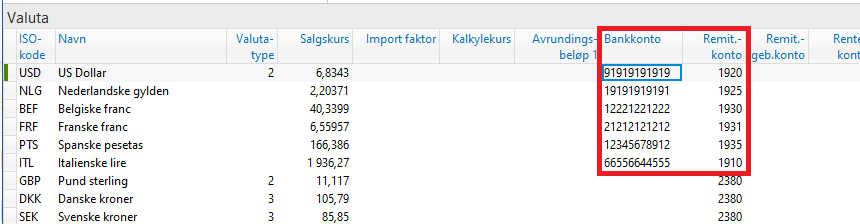
If you have separate bank accounts for different currencies, it may be useful to use the currency table in Visma Business. The currency table can be applied for remittance, both for payments and settlement returns. Instead of creating one bank partner per bank account, you can use the currency table to let the currency determine which bank account the payment is drawn from.
The currency table can also be used for settlement returns, e.g., if you want entries from the same bank account to be posted in different currencies and booked to different accounts in Visma Business.
Setup in Visma Business
-
If you are using the currency table, the following fields under Bank Partner must remain empty:
-
“Charge bank account”
-
“General ledger account bank”
-
“General ledger account fee”
These settings are instead defined in the Currency Table. The field “Std. EBF currency code” must be set to 1.
-

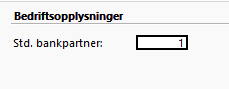
In Company Information, the field “Std. Bank Partner” must point to the bank partner to be used when importing return files. This field must be completed when using the currency table in order to define payment handling on the bank partner. The standard bank partner will be used when the currency table manages the mapping between bank accounts.
In the Currency Table, enter the bank accounts from which payments should be remitted, along with the general ledger accounts for bank and fee postings.