

CONTENT
-
Explanation of parameters for ISO20022
-
Examples of ISO setup for remittance with bank integration (Pain.001)
-
Evry
-
DNB
-
Eika
-
Nordea
-
Danske Bank
-
SEB
-
Bank Connect - SDC
-
Bank Connect - BankData
-
Bank Connect - BEC
-
Handelsbanken Sweden
Explanation of parameters for ISO20022
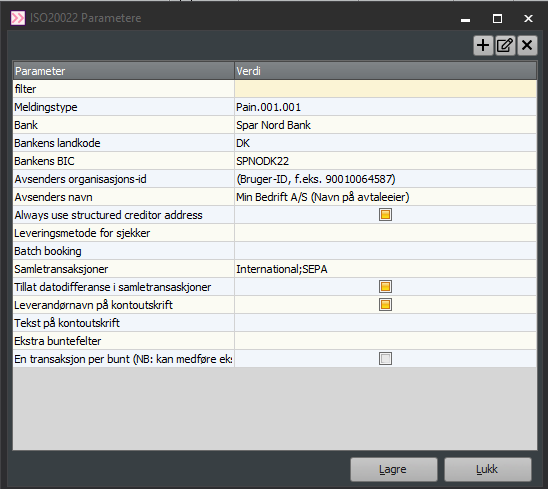
Message type: We support all standard message types in the ISO20022 format and will always support new types continuously. Pain.001 is the standard for remittance and covers current legal requirements. The message type will determine which other parameters are relevant.
Bank: Select the bank connection. The list will be expanded as we add support for more banks. Contact us if you cannot find your bank. Some banks are connected to the data centers Evry or Eika. Evry includes Sparebank1 banks, Sparebanken Sør, Sparebanken Vest, Handelsbanken (Norway), etc. An overview of Eika banks can be found here: https://eika.no/eika-alliansen/lokalbanker
Bank’s country code: Select the country where the company has a customer relationship with the bank. Countries may have different requirements for the ISO standard, and banks also have different implementations across countries, so this should be set correctly automatically.
Bank’s BIC: The BIC code of the bank connection. This is required for sender information. If you don’t know the bank’s BIC, it is easy to find with an internet search.
Sender’s organization ID: Organization number or customer number in the bank. This is a unique identifier between the customer making the payment and their bank connection. What goes here varies between banks—see examples below.
Sender’s name: The name of the company that has the agreement with the bank.
Delivery method for checks: If payment is made by check, the payment type can be defined here. Otherwise, leave this field empty.
Sender’s division: If the sender’s division is required, it will appear here (currently only applies to DNB). It is often XML or XML1. The division name should be visible in the customer’s online bank, but feel free to contact Aritma to ensure you have the correct information.
Batch booking: If the field is empty, the bank’s standard is followed. Can be set to true or false regarding whether to group transactions in the bank. Usage is bank-specific.
Collective transactions: Allows sending an unlimited number of transactions to a supplier in the same order. The payment is sent as an unstructured payment (payment with message). This saves fees and reduces the number of debits in the online bank. Check this option for the relevant payment types (domestic, international, euro payments).
Allowed date difference in collective transactions: Allows grouping transactions that do not have the same due date.
Extra bundling fields: Allows bundling by special rules.
Evry


DNB

Sender’s organization ID: Org. no. of the party that has the agreement with the bank (parent, if corporate structure in online bank).

Customer number in the bank: Org. no. of the account holder (subsidiary) if the customer should be able to view/approve their own transactions. It can also be the bureau’s (parent’s) org. no. if they have authorization over the customer’s account. The payment will then only be available in the bureau’s online bank.
SDC Norge
Applies to Norwegian banks that are part of the Local Bank Alliance. Check which banks are included here: https://www.lokalbank.no/
-
Sender’s organization ID must always be: 976197976 under ISO parameters.

Nordea

Sender’s organization ID must always be: 7522259352 under ISO parameters.

Nordea without bank integration
-
Bank partner in Visma Business – customer number = Agreement number from Nordea.
-
ISO setup in Pay – sender’s organization number = Customer’s own signerID.
-
According to Nordea Sweden, “0” can be used as signerID for customers uploading in the online bank.
Danske Bank


SEB

-
Sender’s organization ID must always be: 00334540750005 under ISO parameters.

Bank Connect - SDC


Bank Connect - BankData


Bank Connect - BEC

Handelsbanken Sverige

