

All new account groups come with a standard set of reconciliation rules used for automatic reconciliation. There is the option to modify these, or create your own rules as needed. As long as there is a pattern in the transactions that are to be matched, it will be possible to create a rule that captures these automatically. To change the rules for an account group, click on "Settings" at the top right corner.
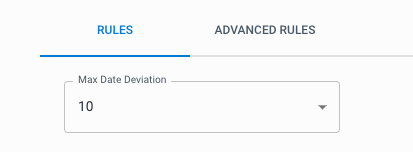
Maximum Date Deviation
The maximum date deviation determines how large the date deviation can be for transactions that are to be matched. This is set by default to 3. It is possible to set the maximum date deviation across all rules for the group, or you can fine-tune the maximum date deviation per rule.
Warning
If you change "Max Date Deviation" under "Rules", the maximum date deviation will change for all the rules in the group. We recommend that you first set this to the desired value, before fine-tuning the maximum date deviation per rule.
Advanced Rules
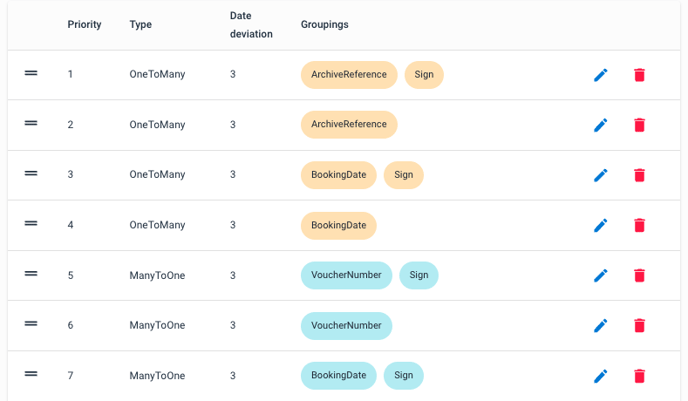
Advanced rules are sorted by priority. Priority can be adjusted by dragging a rule up or down. If transactions match multiple rules, the priority determines which rule they are applied to.
Rule types
Create or edit an advanced rule
Click the blue "New Rule" button to create a new rule. To edit a rule, click the pencil button to the right of the rule. Here you will be presented with options for the rule type, maximum date deviation, and which fields the transactions should be grouped by. Grouping is only relevant for the rule types OneToMany, ManyToOne, and ManyToMany.
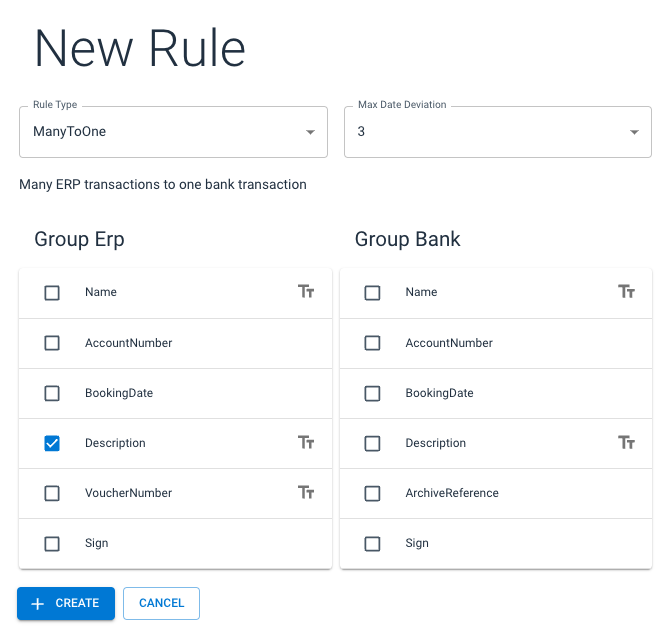
I skjermbildet over, oppretter vi en regel som vil forsøke å gruppere flere regnskapsposter basert på bilagsbeskrivelsen. Dersom den fanger opp en gruppe med bilag som har identisk beskrivelse, vil den sammenlikne summen av beløpene og bokføringsdatoene mot en enkelt post på banksiden. Postene blir automatisk avstemt hvis regelen finner en bankpost med identisk beløp, så lenge avviket mellom bokføringsdatoene ikke overstiger maks datoavvik.
Basert på regelen over, ville disse eksempelpostene blitt avstemt automatisk:
Tekstfilter
Tekstfilter kan brukes til å filtrere transaksjoner basert på diverse tekstoperatører. For å opprette et tekstfilter, trykker du på den grå TT-knappen til høyre for det aktuelle feltet, og legger inn de filtrene du trenger. Husk å trykk Enter for å bekrefte nøkkelord under "FilterValues".
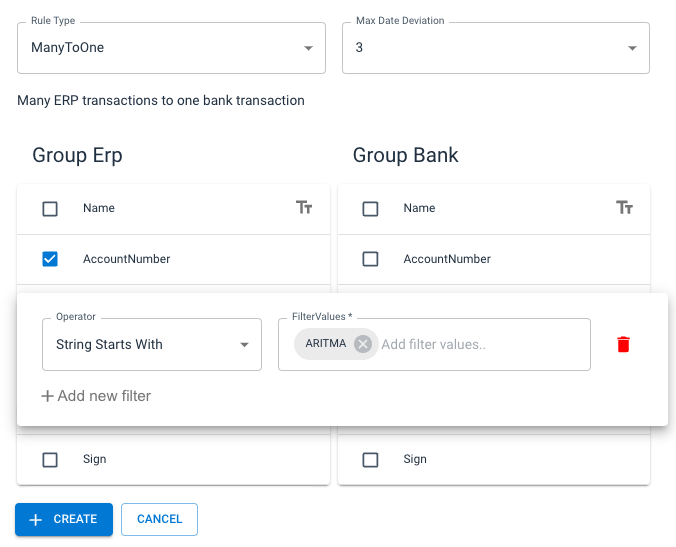
In the screenshot above, the rule will only group accounting entries by the same account, and with a description that begins with "ARITMA". Based on this rule, these example entries would have been automatically reconciled: