

To be able to reconcile accounts across clients in Visma Business/Global, you must set up the connection in the Visma Import Setup window. You will find this in the system menu under Setup – Account Import. Note that you must be in the client where you want to create the account group, and then create a connection to the client where the other account is located.
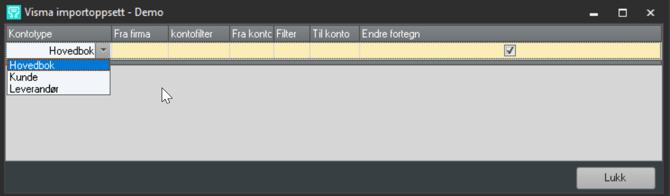
Select account type, from company, from account – then enter to account (which should be the same as from company) and choose Change sign. This will reverse the account on the bank side.
| FELT / FIELD | FORKLARING / DESCRIPTION |
|---|---|
| Kontotype / Account type | Velg hvilken type konto du vil importere fra den andre klienten. / Select which type of account you want to import from the other client |
| Fra firma / From company | Velg hvilken klient du vil importere fra. / Select which client you want to import from |
| Fra konto / From account | Velg konto du vil importere. / Select the account you want to import |
| Til konto / To account | Velg hvilket navn denne kontoen skal få. Denne kontoen vil bli lagt under «tilgjengelige kontorer» på banksiden i kontoveiviseren. Ved avstemming på tvers av klienter, skal det opprettes en kontogruppe av type bankavstemming. / Select the name this account should have. This account will be placed under "available accounts" on the bank side in the account wizard. When reconciling across clients, an account group of type bank reconciliation must be created |
| Filter / Filter | Dersom du vil filtrere bort noen typer transaksjoner, legges det inn et SQL filter her. F.eks. R1 > 1000. / If you want to filter out certain types of transactions, enter an SQL filter here. For example: R1 > 1000 |
| Endre fortegn / Change sign | Kryss av her dersom fortegnet må snus for å få avstemt postene. Beløpet vil da snus på banksiden. / Tick here if the sign needs to be reversed in order to reconcile the items. The amount will then be reversed on the bank side |
When you have filled in an import setup, press Tab or the Down Arrow to register the setup. The account from the other client will now appear as a bank account when you select account type Bank Reconciliation in the account wizard.