

Cause:
From version 14.1 of Visma Business, Visma has encrypted user information, which means that ZDATA Pay (ConvertX) must also be upgraded.
Note: From version 6.0.* of Aritma Pay, the Cred.dat file is no longer required.
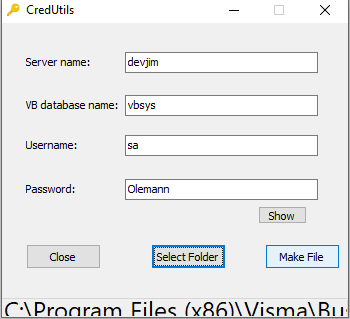
If it does not work after the upgrade, start the program cred.utils.exe, which is found in the program directory.


Enter the login details (the same as in Visma’s EBFInf table in vbsys).
First, select the Folder (directory) for the ConvertX program. Then click Make file (this creates the cred.dat file).
Copy the same file to the program directory for BankX.