

Bank integration uses the ISO20022 format. The files sent to the banks and the return files received from the banks have specific names, depending on the bank. When you set up remittance with bank integration, the file name filters in the Aritma Pay setup must match the bank's file names. Below are examples of what to enter as the file name filter for each bank.
Files to the bank (export)
The payment/remittance file sent to the bank must always be named P001.xml. This applies to every bank.
Return files from the bank (import)
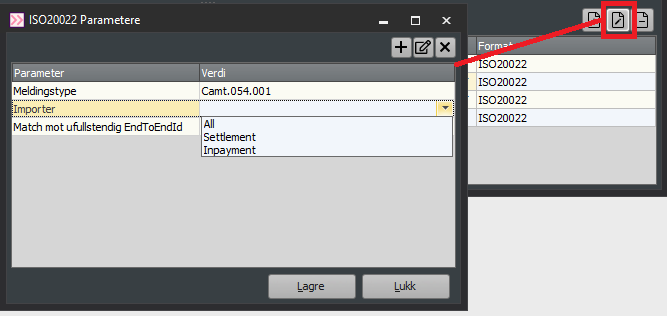
Most banks can deliver three different return files: Pain.002 (receipt), Camt.54 debit (settlement) and Camt.54 credit (incoming payment). Add one line for each of these files in the import setup, under "Files from bank".
If you approve payments in pay.zdata.no, also add a file name filter for receipts from Aritma. When payments are rejected in pay.zdata.no, a receipt is created that can be imported into Visma Business to update the status of the payments to "Rejected". In that case, add the following file name filter:
*p002*.xml
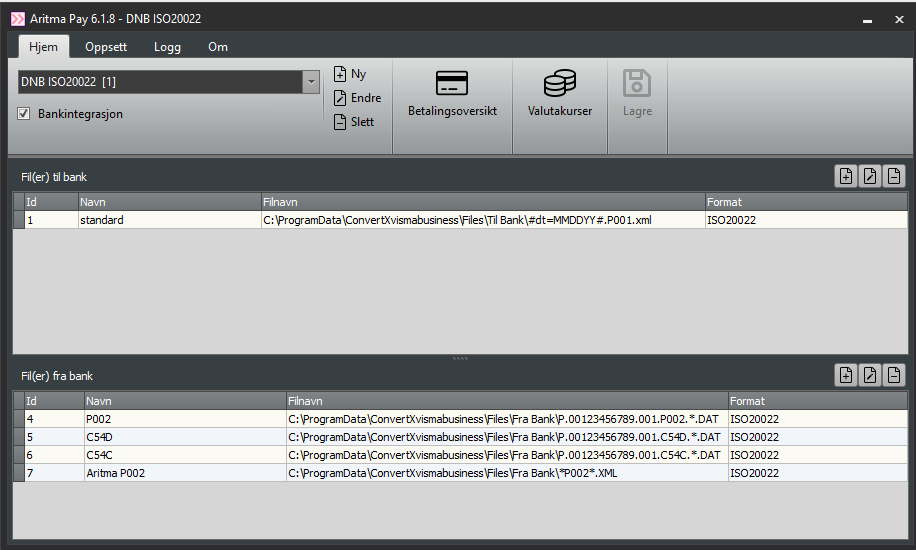
The image below shows an example of what the setup can look like (here the return file names are adapted to DNB).
Danske Bank
??????X*. (Receipt)??????D*. (Settlement)??????I*. (Incoming payment - capital I)
Aritma receipt: *p002*.xml
DNB
P.00123456789.001.P002.*.DAT (Receipt)P.00123456789.001.P002.*.XML (Receipt)P.00123456789.001.C54D.*.DAT (Settlement)P.00123456789.001.C54D.*.XML (Settlement)P.00123456789.001.C54C.*.DAT (Incoming payment)P.00123456789.001.C54C.*.XML (Incoming payment)
Aritma receipt: *p002*.xml
DNB uses .XML in its new core system (2025), but .DAT in the old one. It is therefore a good idea to have an import line for both .DAT and .XML files.
Eika
ERPZDATA_PAIN002*.xml.pgp (Receipt)ERPZDATA_CAMT054D*.xml.pgp (Settlement)
ERPZDATA_CAMT054K*.xml.pgp (Incoming payment)
Aritma receipt: *p002*.xml
Evry
P.00123456789.000.P002.*.DAT (Receipt)P.00123456789.000.C54D.*.DAT (Settlement)
P.00123456789.000.C54C.*.DAT (Incoming payment)
Aritma receipt: *p002*.xml
Nordea
NDCAPXMLO*.xml (Receipt)
NDCAPXMLD54O*.xml (Settlement)
SFTPMessageFromNordeaCAMT054*. (Incoming payment)
Aritma receipt: *p002*.xml
SEB
pain002ban_*. (Receipt)
pain002con_*. (Receipt)
camt054D_*. (Settlement)
camt054C_*. (Incoming payment)
Aritma receipt: *p002*.xml
Swedbank
*.PAIN002.*.XML (Receipt)
*.CAMT054.DENA.*.XML (Settlement, domestic - debit national)*.CAMT054.DEIN.*.XML (Settlement, foreign - debit international)
*.CAMT054.CRNA.*.XML (Incoming payment - credit national (domestic))*.CAMT054.CRIN.*.XML (Incoming payment - credit international)
Aritma receipt: *p002*.xml
Bank Connect - BankData
Pain.002.*.xml (Receipt)
Camt.054.*.xml (Settlement and incoming payment)
Aritma receipt: *p002*.xml
Bank Connect - SDC
Pain.002.*.xml (Receipt)
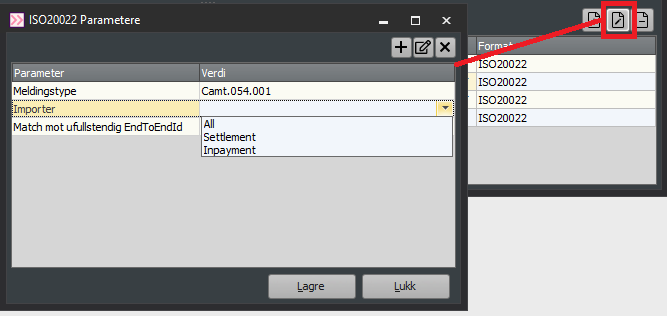
Camt.053.*.xml (Settlement) - needs a filter for system type "Settlement"
Aritma receipt: *p002*.xml
If you also use the reconciliation program Aritma Control with manual file import, the file path in Control looks like this: Camt.053.*.xml.b~1
Bank Connect - BEC
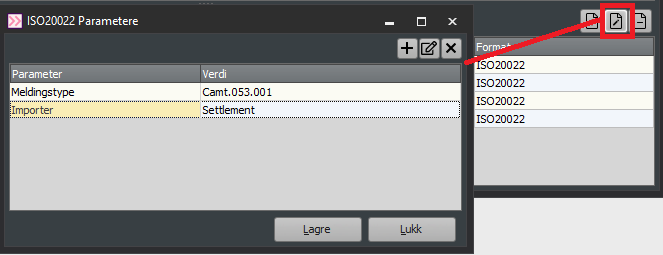
Pain.002.*.xml (Receipt)
Handelsbanken Sweden
GEUT_PAINSTAT_*.5551234567.xml (Receipt)
GEUT_CAMTKRED_*.5551234567.XML (Incoming payment)
GEUT_CAMTDEB_*.5551234567.XML (Settlement)
GEUT_CAMTSATR_*.5551234567.xml (Bank reconciliation)
Handelsbanken Sweden does not send receipts as of February 2024.