A discrepancy occurs when a customer does not pay the exact amount owed. The owed amount is shown in the outstanding balance field in the accounts receivable. Some companies want to post the discrepancy (the difference between the amount paid and the outstanding balance) on a separate line, while others do not. In Pay, there are settings available to handle both options.
The paid amount is posted, the discrepancy is noted as not posted.
Setting:
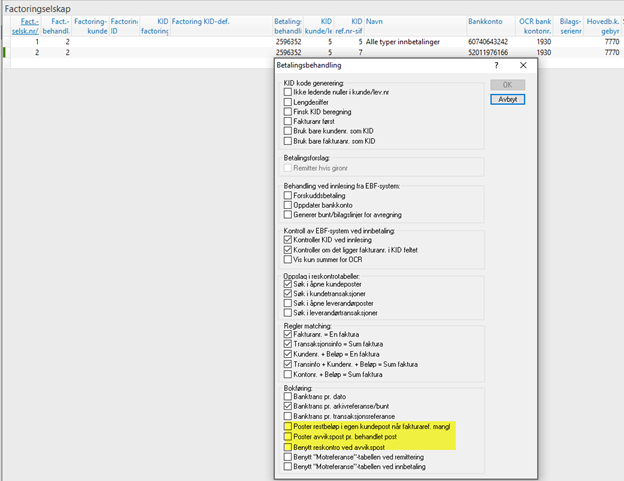
Retrieved from the payment processing on the factoring line being used.
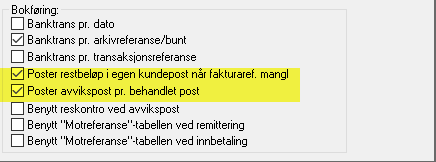
Nothing is checked in the yellow-marked fields (meaning that no discrepancy posting will be created).
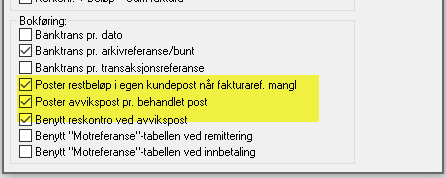
Discrepancy posted to accounts receivable (customer).

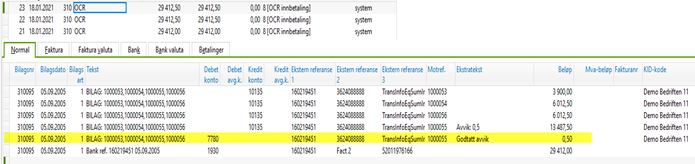
Here the remaining amount on the open item is posted as 13,487.50. The paid amount is still 13,487, which creates a separate line of 0.50 NOK. Since the paid amount is less than the invoice (the remaining amount), the account is posted to debit. If the paid amount had been higher, the account would have been posted to credit.
Setting:
Tick the yellow-marked checkbox.
The discrepancy is posted to a discrepancy account, which is defined in the company settings.
Setting:
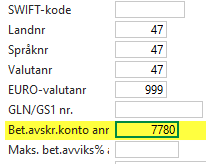
The discrepancy account is configured in the Company Information settings.