

License Message
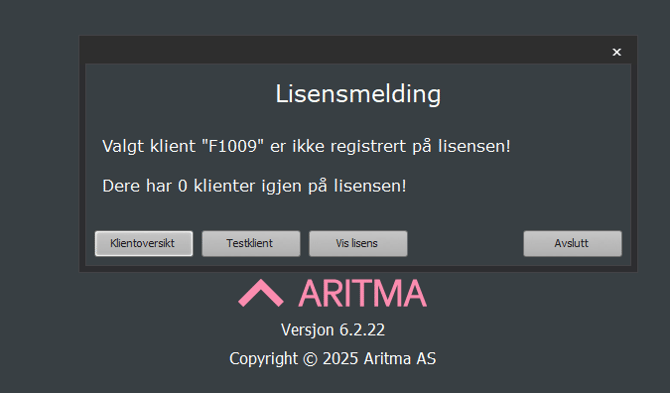
Cause:
This message may appear if a customer has more clients registered in the client setup than are included in their license.
If the customer needs more active clients, the license must be expanded.
Select Client Overview to view the list of active clients.
You can also access this menu via Aritma Pay.
Check registered clients:
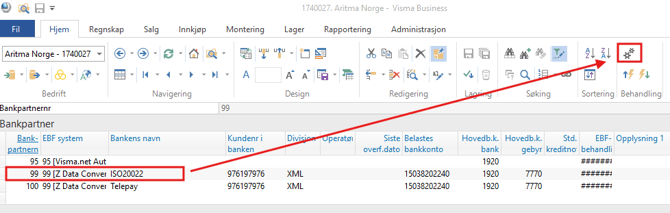
Open Aritma Pay from Bank Partner by selecting a bank partner with EBF system 99 [Z Data Converter] as shown:
Go to Setup → Client Setup, and delete any clients not in use by selecting the line and pressing the minus sign in the bottom left corner.
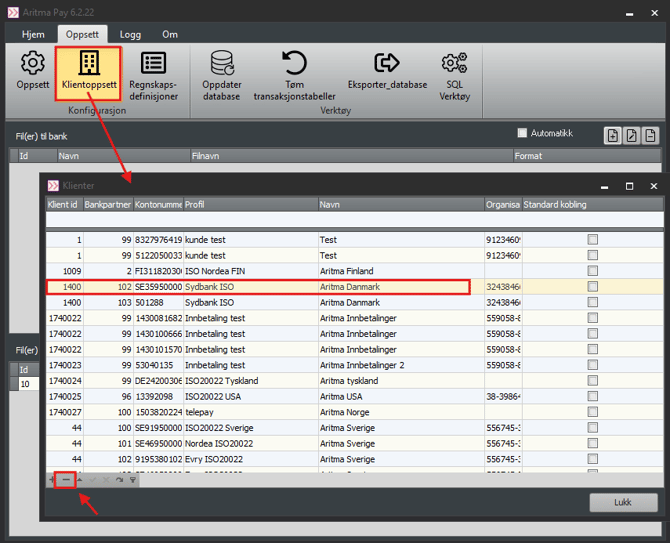
If more clients are in use than are covered by the license, the license must be expanded.
This can be done by contacting support@aritma.com.
This can be done by contacting support@aritma.com.