

Undo import
If you manually import bank files, and for various reasons want to undo an import, this can be done from the Action Log. This may be relevant if you have imported the same file multiple times and thus have duplicate transactions on the bank side.
Note that the import must be undone by the user who performed the original import. When you undo an import, reconciliations with transactions from the import will also be undone.
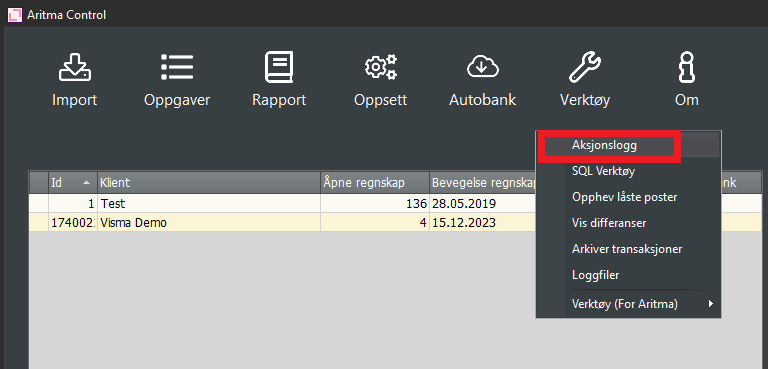
Go to Tools -> Action Log
Select the desired import and click on "Undo". The import that is fully undone will display with a red background.
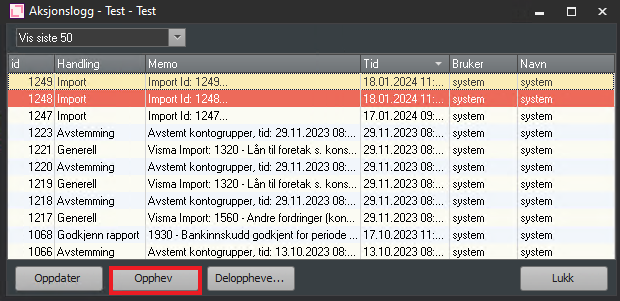
Partial Reversal
If you do not want to reverse the entire import, you can choose to perform a partial reversal. This may be relevant if multiple accounts were imported in the same file and only one of the account imports should be reversed. You can also use partial reversal if there are specific days you want reversed.
When you perform a partial reversal, you select a subset based on the account number or date.
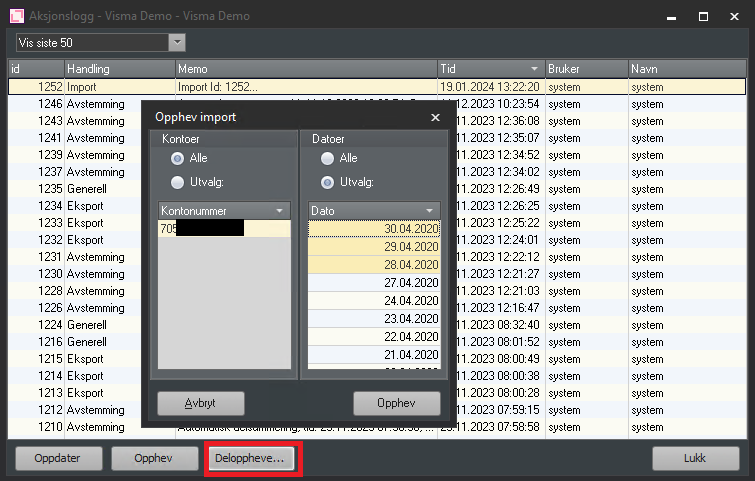
The image shows that an account and a date-based selection have been made. This selection will reverse the import of bank transactions from 28 April 2020 to 30 April 2020.
In cases where multiple files were imported in the same import, it is not possible to reverse a single file. If many files were imported at the same time, for example for multiple different clients, and something that should not have been imported has been included, you can solve this by performing a partial reversal per account number as described above.