

In Aritma Control, a bank account will have a calculated balance and a balance according to the bank's account statement.
Calculated balance = IB (opening balance) + the sum of all transactions in the period
Balance according to the bank statement = amount retrieved from the bank's file
By having a balance generated in Aritma Control and one retrieved from the reconciliation file, users can verify that all transactions in the period have been included, and that none are duplicated.
If there is a difference between these two amounts, it will be marked in red on the reports. The difference can be due to missing or duplicate transactions, or different dates on the balances being compared. In the example below, you can see that the calculated balance has the date 30.11.2019, while the balance according to the bank statement has the date 06.11.2019. The balances are compared at different times, which causes a difference.
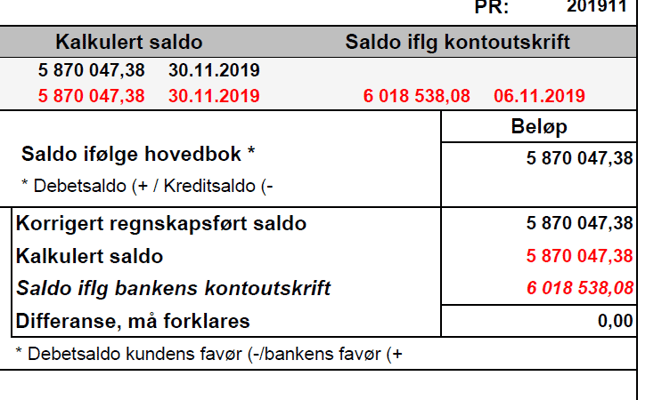
With bank integration, we receive data from the bank daily that contains both transactions and account balance. This ensures that the balance according to the bank statement is always up to date.
If users manually retrieve a file from the bank and import it, the file will only contain the balance for the last date in the selected period. If you retrieve January-March, the balance will be as of 03/31, but if you retrieve only January, the balance will be as of 01/31. In the example above, you can remove the red numbers by importing a file from the bank with 11/30/2019 as the last date in the period. Aritma Control has duplicate control, so you can import multiple times without creating duplicate transactions, provided the same file type and import format are used. If you still end up with duplicate transactions, read more about how to correct this here. Account Balances in Reconciliation Window

- Calculated balance = IB + the sum of all transactions that have been retrieved, the latest date is shown in the last date field.
- Reconciled balance = IB + the sum of transactions up to the period you are working with (reconciled period/date field). The period you are working with is also shown at the upper left (red square).
- Account statement balance = Given balance that is not calculated by Control. In accounting, this balance is retrieved from the accounting system; for example, in Visma Business it is retrieved from the general ledger balance table. The balance applies to the period shown in the account statement period field. In the banking module, this balance is received in a file from the bank, the same as the balance according to the account statement. The balance applies to the date shown in the account statement date.