

The balance for both the bank and the accounts is presented in two ways. The first is Balance, which is the amount we have calculated by summing all the transactions belonging to the account.
The second is Statement Balance, which is the balance we retrieve directly from the account statement. In other words, this is the balance as calculated by the bank or the accounting system.
Balance should always equal Statement Balance. If there is a discrepancy, it most likely means that Control is missing some transactions, or that an incorrect opening balance was entered during the account setup.
Example
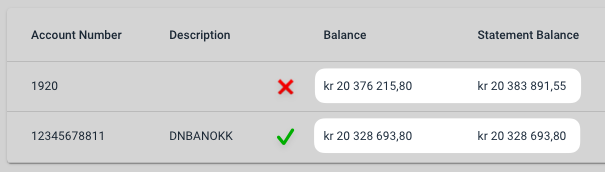
In the image below, we show two example balances. The Balance for account 1920 has been calculated as NOK 20,376,215.80. The Statement Balance shows the balance as retrieved from the accounting system, and as we can see, there is a discrepancy. This means something is incorrect.
For the bank account, however, Balance and Statement Balance match with no discrepancy, so we can safely assume that Control is not missing any transactions.
How to resolve a balance discrepancy
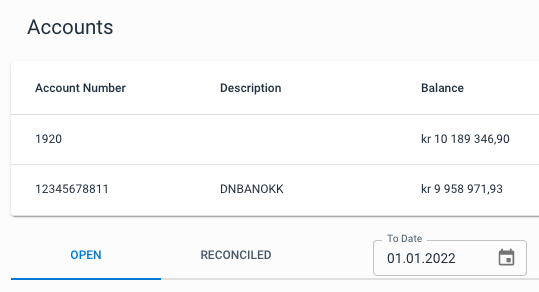
The first thing you should do is double-check that the opening balance you entered during account setup is correct. To check the opening balance, go to the account group in question and set "To Date" to the first day of the opening period. If the account group is configured to reconcile from 202201, set "To Date" to 01.01.2022. You will now see the opening balance in the balance overview. Compare this with the opening balance for the period on the account statement. If it was entered incorrectly, the account group must be deleted and recreated with the correct opening balance.
If the opening balance was entered correctly, the discrepancy is likely due to Control missing some transactions. If that is the case, you should contact Aritma Support, and we will assist you further.